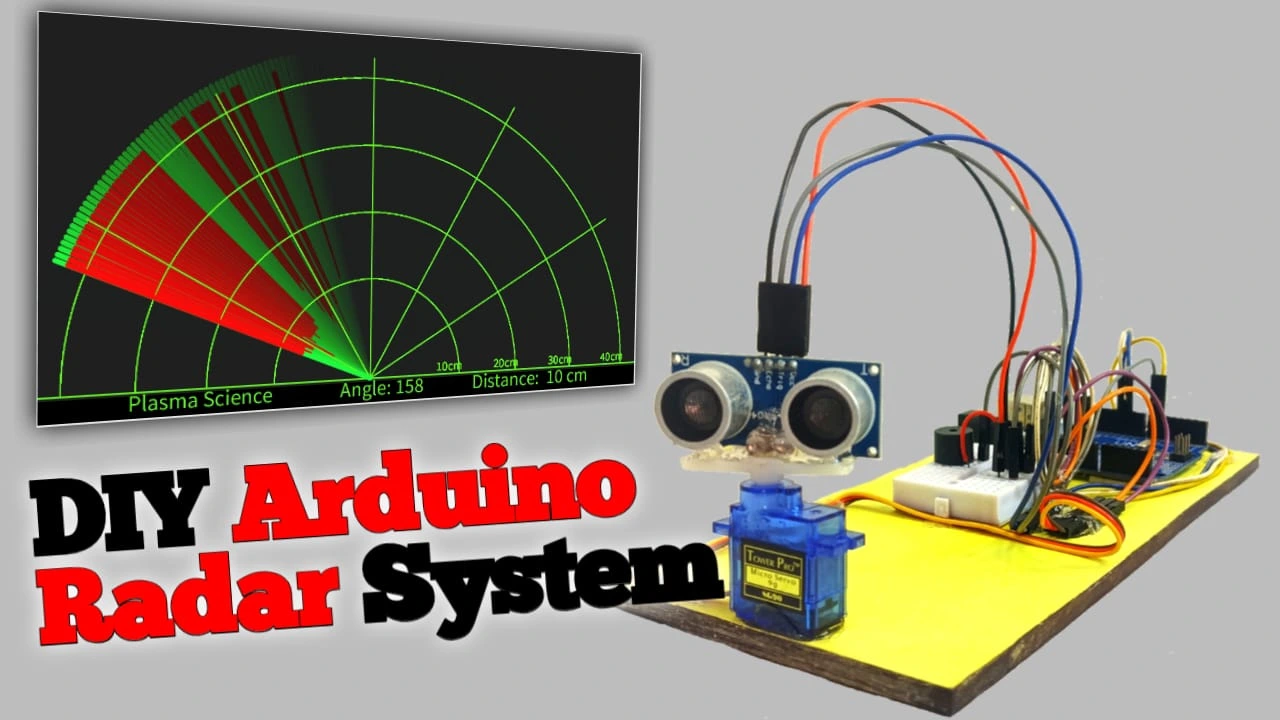

Hello friends, in this tutorial I will teach you how to build a radar system. I will use an Arduino, an ultrasonic sensor, andProcessing software. Processing software will be used to calculate the distance and angle of the scanning area. Even if you’re new to Arduino, you can easily build it. I’ve explained each step of this project below. This project is going to be very interesting, so let’s start building it by following the steps below.
Required Components
To build this radar system, we’ll need a few components. Let’s take a look.
- Arduino Uno
- USB A to USB B Type Cable
- HC SR04 Ultrasonic Sensor
- Servo Motor
- Active Buzzer
- Breadboard
- Jumper Wire
Required Software
- Arduino IDE
- Processing
Table of Contents
How to Ultrasonic Sensor Works ?
Ultrasonic sensors use ultrasonic waves to measure distance. Ultrasonic sensors have two transducers: one is a transmitter and the other is a receiver. The transmitter transmits the ultrasonic waves, while the receiver receives them when they collide with an object.
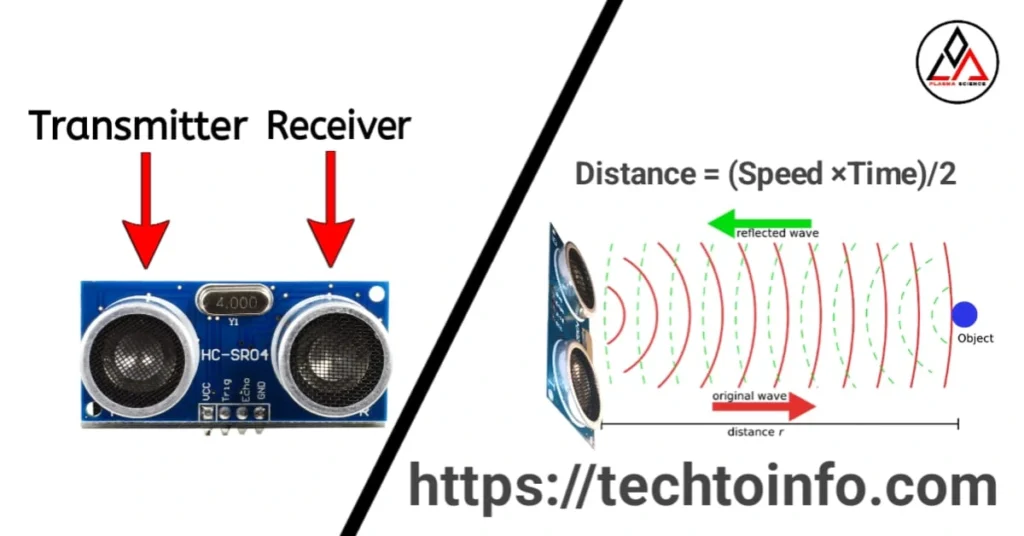
Therefore, when any object comes in front of the ultrasonic sensor, the ultrasonic sensor detects the distance of that object. When ultrasonic waves are transmitted from the transmitter, when those waves collide with any object and get reflected, the receiver catches them and finds out the distance of that object using the formula hmm Distance = (Speed x Time)
Working of Radar System Project
This Arduino radar system is similar to amilitary radar system, with an area scan range of 15° to 165°. In this radar system, the Arduino acts as the brain. The Arduino’s job is to rotate the servo motor from left to right and right to left, measure the distance every 1 degree. After determining the distance and angle, send this data to the processing software, and sound the buzzer if the object is nearby (here the buzzer is set to 20cm).
The Arduino Uno sets the trigger pin of the ultrasonic sensor high for 10ms and low for 2ms, so that pulses reach the ultrasonic sensor, and the ultrasonic sensor transmits ultrasonic waves from the transmitter. When these ultrasonic waves are reflected back from an object, the receiver detects them. The wave is transmitted to the Arduino via the ultrasonic sensor’s Echo pin. Based on the signal received at the Echo pin, the Arduino determines the distance using the formulaDistance = (Speed x Time) / 2.
Here, speed = speed of sound. We know that the speed of sound is 343 meters per second. If we convert this speed of sound to centimeters per microsecond, it becomes 0.034.cm/ms.
Speed of Sound = 343 m/s,
1 meter = 100 cm
Then,
speed of sound = 343 meter/ second
= 343 × 100 cm/s
= 34300 cm/s
1 Second = 1000000 microseconds
then
speed of sound = 34300 ÷ 1,000,000
= 0.0343 cm/µs
Distance = (Speed x Time)/2, in this 2 means round trip time, that is the time taken by the sound to travel is the same as the time taken by the sound to reflect and come back, hence we divide this by 2.
So now Arduino can easily find the distance, and now after knowing the angle and distance, Arduino sends this data to the Processing software through serial communication and the Processing software creates a visual graph based on this data.
Circuit Diagram of Radar system project
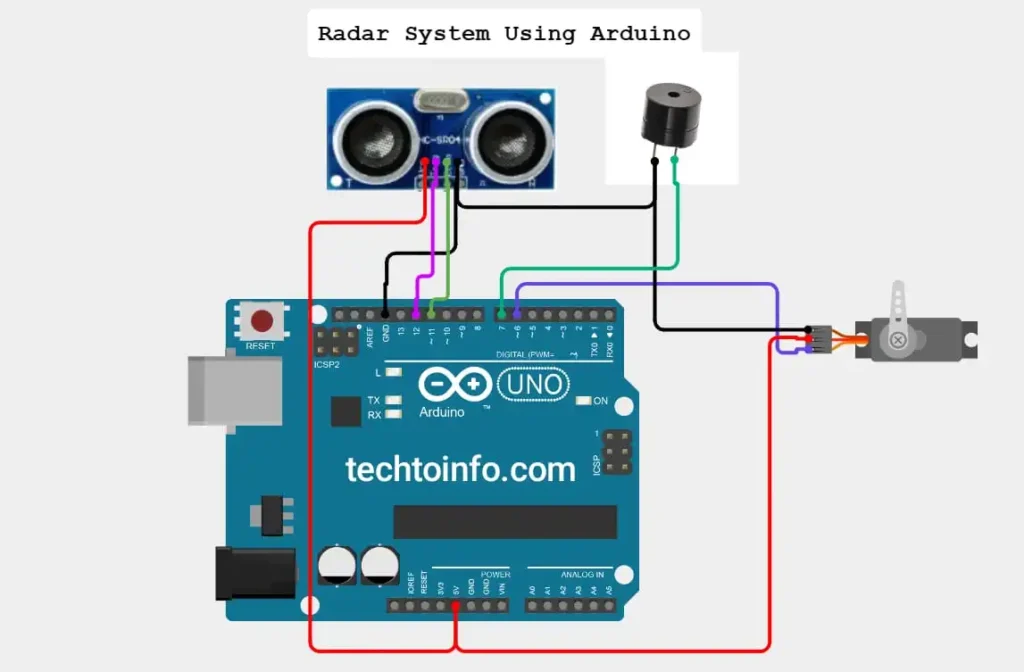
In this circuit diagram, the VCC pin of the ultrasonic sensor is connected to the 5V pin of the Arduino Uno, Trig Pin is connected to the D10 pin of the Arduino, Echo pin is connected to the D11 pin, GND(ground) pin is connected to the GND pin of the Arduino.
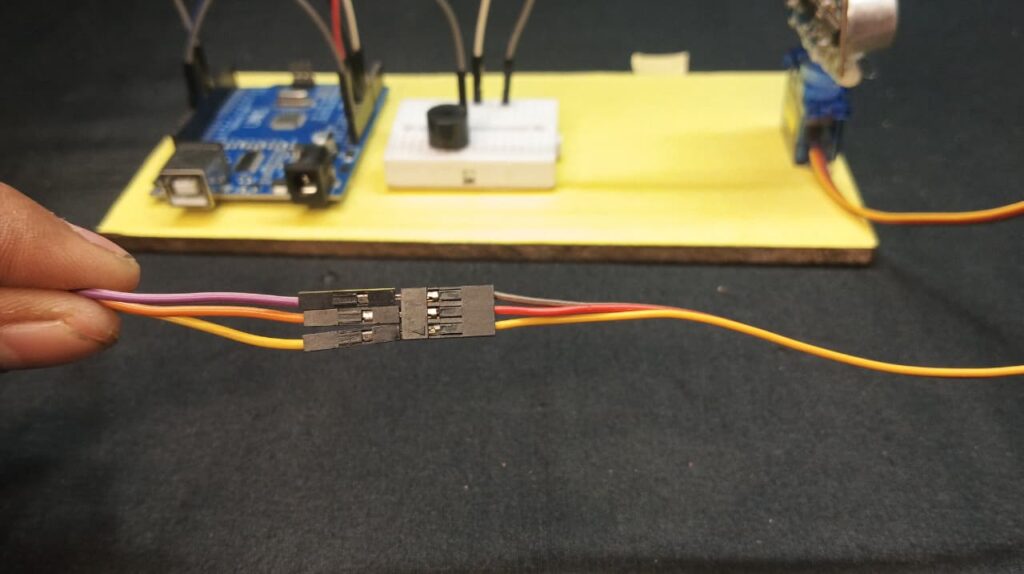
Talking about the connection of servo motor and Arduino, the red wire of the servo motor has to be connected to 5V of Arduino, yellow wire to D6 pin of Arduino and brown wire to GND.
Connect the positive terminal of the buzzer to the D7 pin of the Arduino and the negative terminal to the GND pin.
Radar system project code
/*
  ******************************************************
  * Arduino Radar System Project
  * Components: Ultrasonic Sensor + SG90 Servo + Buzzer
  *
  * Made By: Harsh (Plasma Science Youtube Channel)
  *
  * 🔗 YouTube Channel: https://www.youtube.com/@plasmascienc
  * 🌐 Website: https://techtoinfo.com
  *
  ******************************************************
*/

// Includes the Servo library for controlling the servo motor
#include <Servo.h>

// Ultrasonic Pins
const int trigPin = 10;
const int echoPin = 11;

// Buzzer Pin
const int buzzer = 7;

long duration;
int distance;

Servo myServo;

void setup() {
  pinMode(trigPin, OUTPUT);
  pinMode(echoPin, INPUT);
  pinMode(buzzer, OUTPUT);

  Serial.begin(115200);   // FAST BAUD RATE (lag hatane ke liye)
  myServo.attach(6);
}

// ************* NON-BLOCKING DISTANCE FUNCTION *************
int calculateDistance() {

  digitalWrite(trigPin, LOW);
  delayMicroseconds(2);

  digitalWrite(trigPin, HIGH);
  delayMicroseconds(10);
  digitalWrite(trigPin, LOW);

  // ⚠ pulseIn timeout set kiya 20,000 µs (20ms)
  duration = pulseIn(echoPin, HIGH, 20000);

  if (duration == 0) return 999;   // No detection (timeout)

  int dist = duration * 0.034 / 2;
  return dist;
}
// ***********************************************************

void loop() {

  // LEFT → RIGHT
  for (int pos = 15; pos <= 165; pos++) {
    myServo.write(pos);
    delay(15);   // Fast smooth movement

    distance = calculateDistance();

    if (distance < 20)
      digitalWrite(buzzer, HIGH);
    else
      digitalWrite(buzzer, LOW);

    Serial.print(pos);
    Serial.print(",");
    Serial.print(distance);
    Serial.println(".");
  }

  // RIGHT → LEFT
  for (int pos = 165; pos >= 15; pos--) {
    myServo.write(pos);
    delay(15);

    distance = calculateDistance();

    if (distance < 20)
      digitalWrite(buzzer, HIGH);
    else
      digitalWrite(buzzer, LOW);

    Serial.print(pos);
    Serial.print(",");
    Serial.print(distance);
    Serial.println(".");
  }
}
Radar system Project Processing Code
/*
  ******************************************************
  * Arduino Radar System Project
  * Components: Ultrasonic Sensor + SG90 Servo + Buzzer
  *
  * Made By: Harsh (Plasma Science Youtube Channel)
  *
  * 🔗 YouTube Channel: https://www.youtube.com/@plasmascienc
  * 🌐 Website: https://techtoinfo.com
  *
  ******************************************************
*/

import processing.serial.*;
import java.awt.event.KeyEvent;
import java.io.IOException;

Serial myPort;

String angle = "";
String distance = "";
String data = "";
String noObject;

float pixsDistance;
int iAngle = 0, iDistance = 0;
int index1 = 0;

void setup() {

  size(1200, 700);
  smooth();

  // ✔ Correct baud rate (must match Arduino)
  myPort = new Serial(this, "COM5", 115200); // Change Port

  // ✔ Buffer until full packet comes
  myPort.bufferUntil('.');
}

void draw() {

  fill(98, 245, 31);

  noStroke();
  fill(0, 4);
  rect(0, 0, width, height - height * 0.065);

  fill(98, 245, 31);

  drawRadar();
  drawLine();
  drawObject();
  drawText();
}

void serialEvent(Serial myPort) {

  data = myPort.readStringUntil('.');

  if (data == null) return;

  data = trim(data);

  // Remove dot at end
  if (data.endsWith(".")) {
    data = data.substring(0, data.length() - 1);
  }

  // Check data structure
  if (!data.contains(",")) return;

  try {
    index1 = data.indexOf(",");
    angle = data.substring(0, index1);
    distance = data.substring(index1 + 1);

    iAngle = int(angle);
    iDistance = int(distance);

    // Filtering out invalid ultrasonic readings
    if (iDistance > 400 || iDistance < 0) {
      iDistance = 999;
    }

  } catch (Exception e) {
    // Ignore broken packets
  }
}

 ------------------------------------------------------------

void drawRadar() {

  pushMatrix();
  translate(width/2, height - height * 0.074);
  noFill();
  strokeWeight(2);
  stroke(98, 245, 31);

  arc(0, 0, (width - width * 0.0625), (width - width * 0.0625), PI, TWO_PI);
  arc(0, 0, (width - width * 0.27), (width - width * 0.27), PI, TWO_PI);
  arc(0, 0, (width - width * 0.479), (width - width * 0.479), PI, TWO_PI);
  arc(0, 0, (width - width * 0.687), (width - width * 0.687), PI, TWO_PI);

  line(-width/2, 0, width/2, 0);
  line(0, 0, (-width/2)*cos(radians(30)), (-width/2)*sin(radians(30)));
  line(0, 0, (-width/2)*cos(radians(60)), (-width/2)*sin(radians(60)));
  line(0, 0, (-width/2)*cos(radians(90)), (-width/2)*sin(radians(90)));
  line(0, 0, (-width/2)*cos(radians(120)), (-width/2)*sin(radians(120)));
  line(0, 0, (-width/2)*cos(radians(150)), (-width/2)*sin(radians(150)));

  popMatrix();
}

void drawObject() {

  pushMatrix();
  translate(width/2, height - height * 0.074);
  strokeWeight(9);
  stroke(255, 10, 10);

  pixsDistance = iDistance * ((height - height * 0.1666) * 0.025);

  if (iDistance < 40) {
    line(pixsDistance * cos(radians(iAngle)),
         -pixsDistance * sin(radians(iAngle)),
         (width - width * 0.505) * cos(radians(iAngle)),
         -(width - width * 0.505) * sin(radians(iAngle)));
  }

  popMatrix();
}

void drawLine() {

  pushMatrix();
  strokeWeight(9);
  stroke(30, 250, 60);
  translate(width/2, height - height * 0.074);

  line(0, 0, (height - height * 0.12) * cos(radians(iAngle)),
       -(height - height * 0.12) * sin(radians(iAngle)));

  popMatrix();
}

void drawText() {

  pushMatrix();

  if (iDistance > 40) {
    noObject = "Out of Range";
  } else {
    noObject = "In Range";
  }

  fill(0, 0, 0);
  noStroke();
  rect(0, height - height * 0.0648, width, height);

  fill(98, 245, 31);
  textSize(25);

  text("10cm", width - width * 0.3854, height - height * 0.0833);
  text("20cm", width - width * 0.281, height - height * 0.0833);
  text("30cm", width - width * 0.177, height - height * 0.0833);
  text("40cm", width - width * 0.0729, height - height * 0.0833);

  textSize(40);

  text("Plasma Science", width - width * 0.875, height - height * 0.0277);
  text("Angle: " + iAngle, width - width * 0.55, height - height * 0.0277);

  text("Distance:", width - width * 0.32, height - height * 0.0277);

  if (iDistance < 40) {
    text(iDistance + " cm", width - width * 0.18, height - height * 0.0277);
  } else {
    text("Out", width - width * 0.18, height - height * 0.0277);
  }

  popMatrix();
}
Radar system Project Video Tutorial
Conclusion
In this project, we built a small, fully functional mini-radar detection system using an Arduino Uno, an HC-SR04 ultrasonic sensor, an SG90 servo motor, and a buzzer. The servo motor continuously rotates from 15° to 165°, and the ultrasonic sensor measures distance at each angle, allowing the system to perform real-time scanning—just like a real radar.
This project combines learning about sensor working, servo control, signal timing, and serial communication.
You can use this project for a science exhibition, school project, or final year project. This is a great demo Meodel project.

How to make a Radar system using Arduino and Ultrasonic Sensor
Hello friends, in this tutorial I will teach you how to build a radar system. I will use an Arduino, an ultrasonic sensor, andProcessing software. Processing software will be used to calculate the distance and angle of the scanning area. Even if you’re new to Arduino, you can easily build it. I’ve explained each step…